Jelly Fish: A Handwritten Font for Modern Web Design
In the fast-paced world of digital product creation, selecting the right typeface is often the difference between a generic interface and a memorable brand experience. As web designers and UI specialists, we constantly search for fonts that balance personality with performance. Jelly Fish, a trendy handwritten font available through Script Amp, offers exactly this blend. It brings a contemporary atmosphere to screen-based designs while maintaining the impeccable form inspired by timeless classic calligraphy. For those building landing pages, online stores, or SaaS dashboards, this typeface serves as a powerful tool to inject elegance and class without sacrificing modern usability.
Visual Personality and Digital Appeal
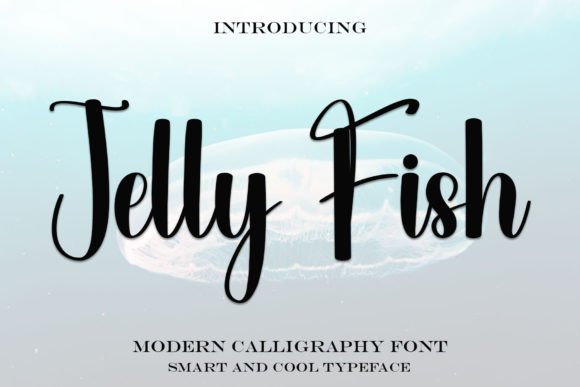
The visual character of Jelly Fish is defined by its fluid strokes and organic rhythm. Unlike rigid geometric sans serif fonts often used in tech interfaces, this script font introduces a human touch. The letterforms mimic the natural flow of a pen, creating a sense of movement that guides the user's eye across the screen. This makes it an excellent choice for brands that want to appear approachable yet sophisticated.
When deployed in a web environment, the font's "impeccable form" ensures that even at larger display sizes, the characters remain distinct and legible. The variation in stroke width adds depth to flat design layouts, providing a subtle texture that enhances visual hierarchy. For digital creators, this means you can establish a clear focal point in your hero sections or banner graphics without relying solely on color or imagery. The font acts as a decorative accent that simultaneously communicates brand tone.
Strategic Applications in Web Layouts
Integrating a handwritten font like Jelly Fish requires strategic placement to maximize impact while maintaining readability. It is not designed for long-form body copy but excels in specific high-impact areas of a website or app.
- Hero Sections and Landing Pages: Use Jelly Fish for main headlines to immediately capture attention. Its elegant curves stand out against clean backgrounds, setting a premium tone for the rest of the content.
- Call-to-Action Buttons: Short phrases like "Join Now" or "Get Started" gain a personal feel when rendered in this script, potentially increasing click-through rates by feeling less robotic.
- Brand Logos and Icons: The unique letterforms make it suitable for logo design within digital products, offering a custom look that differentiates a brand from competitors using standard system fonts.
- Social Media Graphics: When creating assets for Instagram or LinkedIn to promote a new course or product launch, this font adds a layer of editorial design quality to static posts.
- Testimonials and Quotes: Highlighting customer feedback in Jelly Fish separates it from the main narrative, giving it the weight of a personal endorsement.
Enhancing Readability and User Experience
A common concern with script fonts is their performance on mobile devices. However, Jelly Fish is engineered with digital readability in mind. The open counters and consistent baseline ensure that text remains scannable even on smaller smartphone screens. To optimize the user experience, designers should adhere to specific sizing guidelines. For mobile headers, ensure the font size is large enough to prevent the intricate details of the handwriting from blurring together. A minimum size of 24px to 32px is generally recommended for primary headings on mobile viewports.
Contrast plays a crucial role in how this font performs. Because of its flowing nature, Jelly Fish works best on solid, high-contrast backgrounds. Placing white text over a dark image overlay can sometimes reduce legibility if the background is too busy. In such cases, adding a subtle drop shadow or a semi-transparent backdrop behind the text can preserve the font's clarity. For light mode interfaces, deep charcoal or navy blue text often looks more refined than pure black, softening the overall aesthetic while maintaining accessibility standards.
Effective Font Pairing Strategies
To create a balanced typographic system, pairing Jelly Fish with the right supporting typeface is essential. The goal is to contrast the organic, decorative nature of the script with a structured, neutral font.
Option 1: The Modern Minimalist
Pair Jelly Fish with a clean sans serif font like Inter, Roboto, or Helvetica Neue. Use the sans serif for all body copy, navigation menus, and data tables. This combination creates a professional look where the script acts as the "voice" of the brand, and the sans serif handles the informational heavy lifting. This is ideal for coaching websites, portfolio sites, and modern e-commerce stores.
Option 2: The Editorial Elegance
For a more luxurious or traditional feel, combine Jelly Fish with a refined serif font such as Playfair Display or Merriweather. This pairing evokes a sense of heritage and trust, making it perfect for boutique online shops selling handmade goods, wedding planning services, or high-end consulting firms. The serif font adds authority, while the handwritten element adds warmth.
Technical Considerations for Developers
Before implementing Jelly Fish into a production environment, it is vital to check the technical specifications provided by Script Amp. Ensure that the package includes webfont formats (WOFF and WOFF2) for optimal loading speeds across browsers. Slow-loading fonts can negatively impact Core Web Vitals, so utilizing modern formats is non-negotiable for performance-focused sites.
Additionally, verify the multilingual support if your project targets a global audience. A robust character set including accented characters and alternative glyphs allows for greater design flexibility. Some versions of premium fonts include stylistic alternates that let you swap out specific letters to avoid repetitive shapes in words with double letters, enhancing the natural handwritten illusion.
Licensing and Commercial Use
Finally, always review the licensing agreement before deploying Jelly Fish in client projects or commercial products. Most premium fonts from marketplaces like Script Amp require a specific desktop license for creating static images and a separate webfont license for embedding code on live domains. If you are building a template for sale or a SaaS platform where end-users might generate content using the font, an extended commercial license is typically required. Respecting these terms protects both the designer and the client from legal issues while supporting the type foundry.
By thoughtfully integrating Jelly Fish into your design system, you elevate the emotional resonance of your digital products. It transforms standard layouts into branded experiences that feel curated and human-centric. Whether you are designing a course sales page or a corporate landing page, this typeface offers the versatility needed to communicate sophistication in a crowded digital landscape.